Conversion Reporting Pixel
==========================
A conversion pixel is placed on an advertiser's web page to report a conversion event that triggers payouts on the platform. Typically, the pixel is placed on a shopping cart confirmation page or lead form thank you page.
To report conversions using a pixel
-----------------------------------
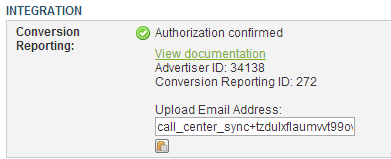
Verify that you have received the Conversion Reporting credentials email from support, including your Upload Email Address and Conversion Reporting ID.
For "Publisher Promotion" or Fixed Price "Bundled" Campaigns, view your Conversion Reporting credentials in the Campaign Summary tab, Integration section.
.. raw:: html
 **Advantages:**
- Easy to integrate - simply add a 1x1 image tag with a specific URL.
**Disadvantages:**
- Requires that the visitor came to the site via an Invoca tracking link.
- Pixel must be hit in a browser (it can not be done in a redirect, or from a background process).
Pixel URL
---------
``http://api.invoca.net/pixels/conversion/ADVERTISER_ID.gif?SALES_PARAMS``
For "Publisher Promotion" or Fixed Price "Bundled" Campaigns, the Advertiser_ID is listed on the Campaign Summary, Integration panel.
For all other campaign types, the Advertiser_ID is accessible from the Advertiser Home Page. Note the address b in the ar the browswer in t he rD follows /as/ in the URL.
.. raw:: html
**Advantages:**
- Easy to integrate - simply add a 1x1 image tag with a specific URL.
**Disadvantages:**
- Requires that the visitor came to the site via an Invoca tracking link.
- Pixel must be hit in a browser (it can not be done in a redirect, or from a background process).
Pixel URL
---------
``http://api.invoca.net/pixels/conversion/ADVERTISER_ID.gif?SALES_PARAMS``
For "Publisher Promotion" or Fixed Price "Bundled" Campaigns, the Advertiser_ID is listed on the Campaign Summary, Integration panel.
For all other campaign types, the Advertiser_ID is accessible from the Advertiser Home Page. Note the address b in the ar the browswer in t he rD follows /as/ in the URL.
.. raw:: html
 The Sales_Params available are documented in Conversion Reporting API under the "Shared Parameters for Sales and Web Conversions" section.
The advertiser campaign and publisher are determined based on what link drove the traffic to the advertiser's site, and are calculated automatically.
We support tying a web pixel to a subsequent server-side conversion. In order to tie the conversions together, you must have passed a reference_id to the original web pixel, and also pass that same reference_id to the Conversion Reporting API.
Example URLs
------------
(assuming that Advertiser_ID = 1)
Most basic URL, just reports that a conversion occurred, but without a sale or any additional data:
``http://api.invoca.net/pixels/conversion/1.gif``
Report a conversion where a $10 sale occurred:
``http://api.invoca.net/pixels/conversion/1.gif?sale_amount=10``
Report a conversion with specific sales data:
``http://api.invoca.net/pixels/conversion/1.gif?sale_amount=10&reason_code=renewal&sku_list[]=34657``
Report a conversion with multiple sku items:
``http://api.invoca.net/pixels/conversion/1.gif?sale_amount=10&sku_list[]=dog&sku_list[]=cat``
Report a conversion with unique identifier to track later (in the Transactions API or future pixel-based conversions):
``http://api.invoca.net/pixels/conversion/1.gif?sale_amount=0&reason_code=new_signup&reference_id=2012994455``
Update a conversion that was reported earlier:
``http://api.invoca.net/pixels/conversion/1.gif?sale_amount=95.0&reason_code=confirmed_order&parent_reference_id=2012994455``
----
*Web pixel example*
.. code-block:: html
Order Confirmation
The Sales_Params available are documented in Conversion Reporting API under the "Shared Parameters for Sales and Web Conversions" section.
The advertiser campaign and publisher are determined based on what link drove the traffic to the advertiser's site, and are calculated automatically.
We support tying a web pixel to a subsequent server-side conversion. In order to tie the conversions together, you must have passed a reference_id to the original web pixel, and also pass that same reference_id to the Conversion Reporting API.
Example URLs
------------
(assuming that Advertiser_ID = 1)
Most basic URL, just reports that a conversion occurred, but without a sale or any additional data:
``http://api.invoca.net/pixels/conversion/1.gif``
Report a conversion where a $10 sale occurred:
``http://api.invoca.net/pixels/conversion/1.gif?sale_amount=10``
Report a conversion with specific sales data:
``http://api.invoca.net/pixels/conversion/1.gif?sale_amount=10&reason_code=renewal&sku_list[]=34657``
Report a conversion with multiple sku items:
``http://api.invoca.net/pixels/conversion/1.gif?sale_amount=10&sku_list[]=dog&sku_list[]=cat``
Report a conversion with unique identifier to track later (in the Transactions API or future pixel-based conversions):
``http://api.invoca.net/pixels/conversion/1.gif?sale_amount=0&reason_code=new_signup&reference_id=2012994455``
Update a conversion that was reported earlier:
``http://api.invoca.net/pixels/conversion/1.gif?sale_amount=95.0&reason_code=confirmed_order&parent_reference_id=2012994455``
----
*Web pixel example*
.. code-block:: html
Order Confirmation
 Your order has been placed.
Old version (before December 2012)
----------------------------------
This version is only supported for existing installations. Conversions generated by this version can not be tied to future server-based conversions.
``http://api.invoca.net/tracked_actions/web_sale/ADVERTISER_ID?SALES_PARAMS``
The following sales params are supported:
- `amount` (sale amount)
- `currency` (sale currency, defaults to USD)
- `external_data` (string, shown in reports)
Your order has been placed.
Old version (before December 2012)
----------------------------------
This version is only supported for existing installations. Conversions generated by this version can not be tied to future server-based conversions.
``http://api.invoca.net/tracked_actions/web_sale/ADVERTISER_ID?SALES_PARAMS``
The following sales params are supported:
- `amount` (sale amount)
- `currency` (sale currency, defaults to USD)
- `external_data` (string, shown in reports)